Speak messy,
it writes clean.
All on your Mac.

Smart AI dictation for your Mac, powered by our own fine-tuned local models. Hold a key, talk, and clean writing lands in any app.

one-time payment 100% local · works offline lifetime updates
MADE WITH ♥ IN SWEDEN

A person leaning back at their desk, talking to a laptop with a full page of finished writing on screen.

AI dictation apps are amazing.

Same minute, three times the words. You talk, the machine writes, and it reads like you took your time.

Typical figures for sustained typing vs. natural speech.

Two people at identical desks: one typing hard with barely a line written, one leaning back talking with a full page done.

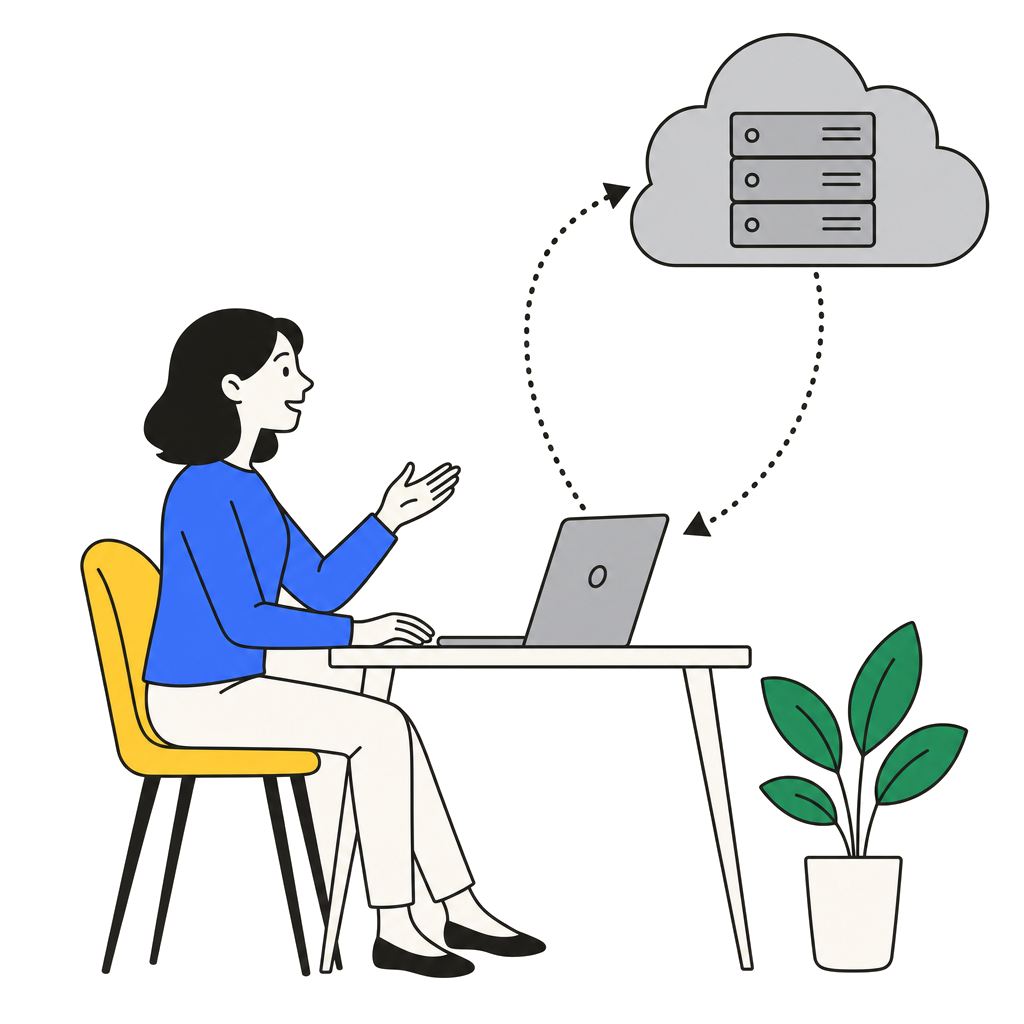
Most of them send your voice on a round trip.

Cloud dictation records you, uploads the audio to servers, and sends your own words back.

  • Your audio is uploaded to servers
  • No internet, no dictation
  • A subscription that never ends
  • Privacy by promise — not by design
A woman dictates to her laptop; her voice travels up to a cloud server and her words are sent back down.
The same woman dictates and everything stays inside her laptop.

So we fixed it.

We fine-tuned our own models for exactly one job: turning what people actually say into what they meant to write — fast, reliably, privately, wherever your laptop goes.

  • The whole pipeline runs on your Mac
  • Works anywhere — Wi-Fi or not
  • Pay once, keep it forever
  • Privacy by design: nothing to upload, nowhere to leak

Localflow vs. the cloud apps.

localflowon-device Wispr Flowcloud Superwhisperhybrid Aqua Voicecloud
One-time purchase $25 — yours forever not offered ~$249.99 not offered
Subscription never $12–15 / month ~or $8.49 / month $8 / month
Total after 2 years $25still $288+and counting $170+or $249.99 once $192and counting
Where your voice is processed on your Mac their servers ~device or cloud their servers
Works with Wi‑Fi off fully offline ~partly

Competitor prices as published July 2026 (Wispr Flow Pro $12/mo annual–$15/mo monthly; Superwhisper $8.49/mo, $84.99/yr or $249.99 lifetime; Aqua Voice $8/mo billed annually). Plans change — check their sites.

Hold. Talk. Done.

STEP 1 fn

Hold fn

In any app — email, docs, chat, code. Wherever your cursor is, that's where the words go.

STEP 2 “um, so basically…”

Say it like you'd say it

Ramble, stumble, change your mind halfway. Don't perform — just talk.

STEP 3 clean text ✓

It lands finished

Release the key and polished writing drops in — ums gone, sentences whole, your voice intact.

Pay once. Keep it forever.

No subscription, no renewal, no meter running. One payment buys the app, our fine-tuned models, and every update we ever ship.

FOR APPLE SILICON MACS · M1 AND NEWER

Solo

One license · one Mac

$25ONE-TIME · LIFETIME ACCESS
  • Lifetime updates — app and models
  • Our fine-tuned models included
  • Works on one Mac
Get Localflow
MOST POPULAR

Duo

Two licenses · two Macs

$39ONE-TIME · LIFETIME ACCESS
  • Lifetime updates — app and models
  • Our fine-tuned models included
  • Works on two Macs
Get Localflow

Trio

Three licenses · three Macs

$49ONE-TIME · LIFETIME ACCESS
  • Lifetime updates — app and models
  • Our fine-tuned models included
  • Works on three Macs
Get Localflow

Localflow for teams

$17 per seat · one-time · minimum 10 seats. Same lifetime access and lifetime updates on every seat.

SEATS
$17 × 10 SEATS · BILLED ONCE $170
Contact us

ALREADY BOUGHT? DOWNLOAD THE APP AND PASTE YOUR KEY

Fair questions, straight answers.

How do I get the app after paying?+

Right after checkout you get an email with your license key. Then download Localflow, drag it to Applications, and paste your key on first launch — the app fetches its models and you're dictating two minutes later.

Does my voice ever leave my Mac?+

No. Listening, transcribing and cleanup all run on your Mac. The only things Localflow ever talks to the internet for are activating your license and downloading models and updates — never your audio, never your text.

Is it really a one-time purchase?+

Yes. You pay once and the app is yours for good — including future app versions and every new fine-tuned model we release. No subscription hiding behind an asterisk.

What do lifetime updates include?+

Everything we ship: app improvements, new features, and each new generation of our models. When we train a better one, Localflow tells you and downloads it — free.

What models does it use?+

Our own. We fine-tune models for exactly one job — turning natural speech into finished writing — and every license includes them. When we train a better generation, your copy updates for free.

Which Macs does it run on?+

Any Mac with Apple Silicon (M1 or newer). Localflow runs the models on the Mac's own neural hardware — that's what makes local this fast.

Do I need internet?+

Only twice: to activate your license and to download the models. After that you can turn Wi-Fi off and dictate all day.

I'm coming from Wispr Flow — what changes?+

The habit is the same: hold a key, talk, release. What changes is where it happens — your audio stops going to the cloud, the monthly bill stops, and the cleanup runs on models trained just for this.

How many Macs can I use it on?+

Exactly as many as your plan includes — one for Solo, two for Duo, three for Trio. Your key activates on those Macs and stays tied to them. If you ever replace a machine, write to us and we'll sort it out.

Stop typing. Start talking.

Download Localflow, hold fn, and say the first thing that comes out. It'll read like you meant it.

one-time purchaselifetime access & updates
A person leaning back at their desk, talking to a laptop with a full page of finished writing on screen.